Effortless Replacement of Grammer Driver Seat Cushions: A Simple Guide
Our guide makes replacing Grammer Driver Seat Cushions simple, enhancing your driving comfort. Whether you're in long-haul trucking, operating agricultural machinery, or any job that keeps you in the seat for long hours, comfort is crucial. Grammer, a leader in ergonomic seating solutions, knows the importance of comfort and durability.
Learn how to upgrade your Grammer Driver Seat Cushions for maximum comfort. We guide you through cushion replacement and when to think about a chair upgrade. This guide is here for both professional drivers and those seeking better seating.
Easy Steps for Upgrading Your Grammer Driver Seat Cushions
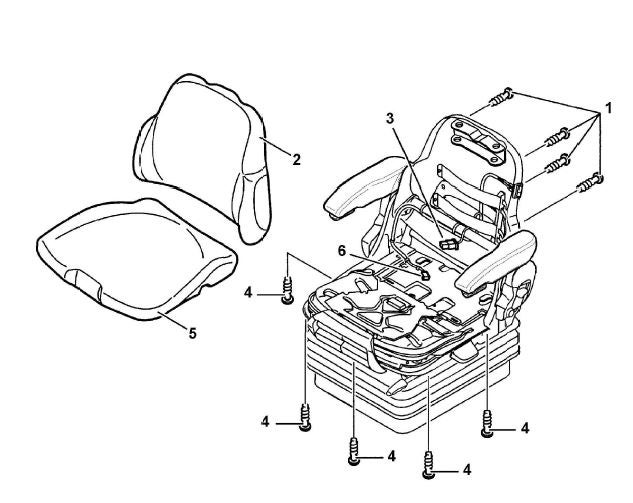 (1) Screw
(2) Backrest Cushion
(3) Backrest Cushion Plug Connection
(4) Screw
(5) Seat Cushion
(6) Seat Cushion Plug Connection
(1) Screw
(2) Backrest Cushion
(3) Backrest Cushion Plug Connection
(4) Screw
(5) Seat Cushion
(6) Seat Cushion Plug Connection Step 1: Unscrew the Screws
Start by removing the screws (1) that keep your Grammer Driver Seat Cushions secured. These screws maintain the position of the cushions and backrest.
Step 2: Disconnect Seat Heating (If Applicable)
If your seat has heating, gently pull the backrest cushion (2) slightly forward. This gives you access to the connection between the backrest cushion (3) and the seat heating element. Disconnect it safely.
Step 3: Remove Backrest Cushion
With the plug disconnected, remove the backrest cushion (3) from the seat. This is crucial for cushion replacement or maintenance.
Step 4: Remove Front Screws (No Length or Tilt Adjustment)
If your Grammer seat doesn't have length and tilt adjustments, take out the three front screws (4) securing the seat cushions. These must be removed for replacement.
Step 5: Remove Side Screws (With Seat Length and Tilt Adjustment)
For seats with length and tilt adjustment, unscrew the four side screws (4) holding the cushions in place.
Step 6: Remove Seat Cushion (If Applicable)
If your Grammer seat has a separate seat cushion (Step 5), remove it now. This is a critical part of the replacement process.
Step 7: Installation
Reinstalling your Grammer Driver Seat Cushions follows the reverse of the removal steps. Secure the new cushions and backrest to restore your seat's comfort and function. Tighten screws to 3.5 Newton-meters (Nm) for secure fitting.
These steps will help you replace your Grammer Driver Seat Cushions easily, ensuring comfort on the road.
Expert Advice on Replacing Grammer Driver Seat Cushions
We learn by trial, error, or training. Always refer to the manufacturer’s guide. You can also talk to your Kramp product specialist or find a Kramp dealer near you.